


Rewrite when needed
Explore in greater depth, simplify, provide an alternative explanation or adapt the content to the class and to specific needs.

MINERVA FOR TEACHERS
Enter the subject, class, duration and topic. Minerva prepares a lesson outline organised by time and objectives. Review and refine it before generating explanations, exercises, solutions and student materials.


It takes a few seconds, and you can pause it at any time.
Time slots
Material to generate for each slot
Setting up the lesson
The lesson plan remains editable and becomes the basis for explanations, exercises, solutions and student materials.
Minerva prepares an initial structure. Change timings, objectives and activities manually, or describe what you would like to revise. The teacher always makes the final decision.
Each stage is assigned a time slot with objectives, activities and materials. Rearrange the sequence until it reflects the way you want to teach.
For each section, generate an explanation, exercises with solutions and a student worksheet. Review and edit the materials before exporting them.
Download one time slot when that is all you need, or export the complete lesson as a PDF.
UNDERSTAND BETTER WHILE YOU PREPARE
Open Understand better on any piece of material and choose how to develop it. Explore or simplify the explanation, prepare a revision version, add examples, analogies, prerequisites, common mistakes, comprehension questions or practical activities. Work on one time slot or apply the same approach to the whole lesson.
Explore in greater depth, simplify, provide an alternative explanation or adapt the content to the class and to specific needs.
Insert examples, analogies, everyday connections, prerequisites, questions and activities below the existing material.
The result opens in preview. Add it, replace the material, copy it, regenerate it or discard it.
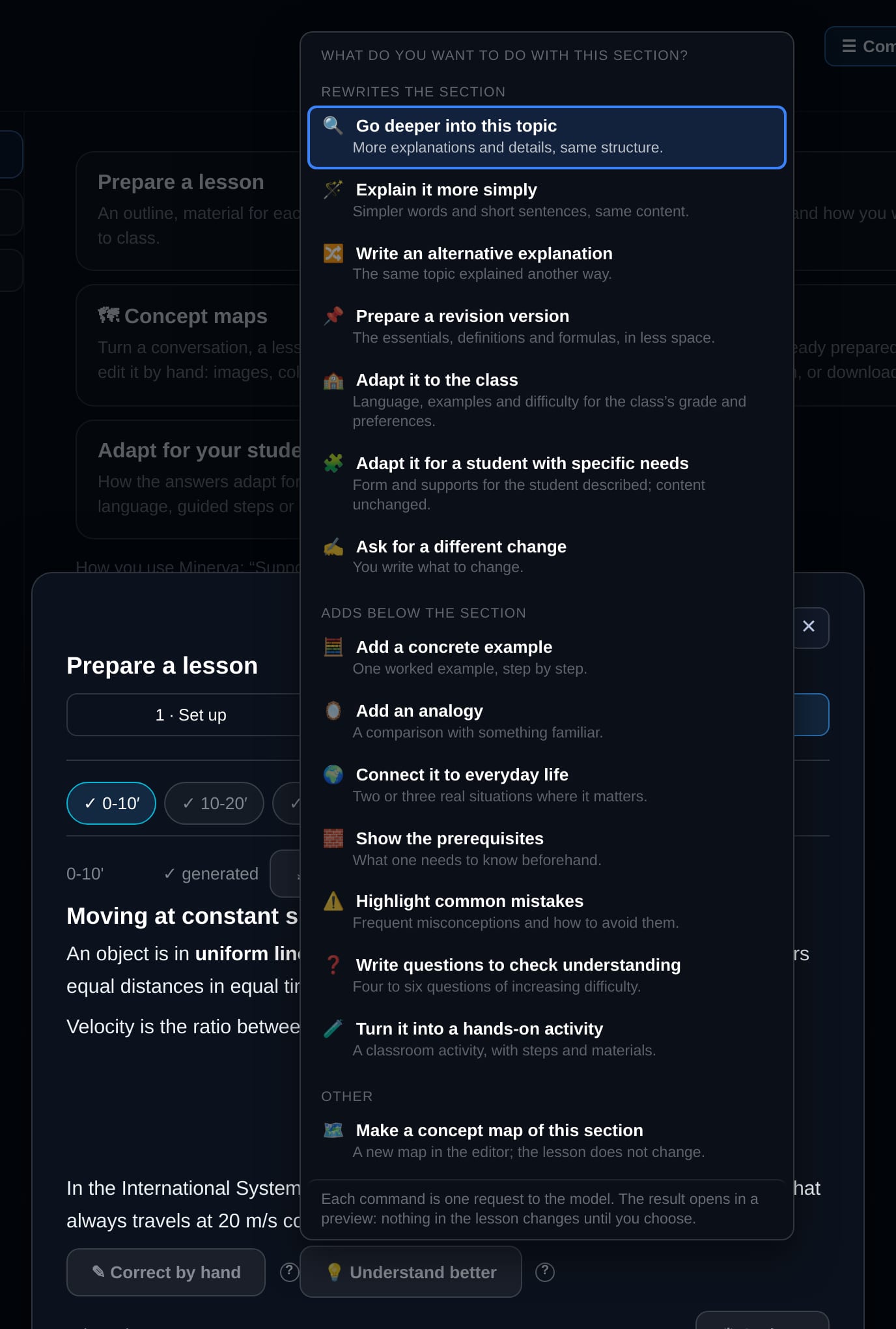
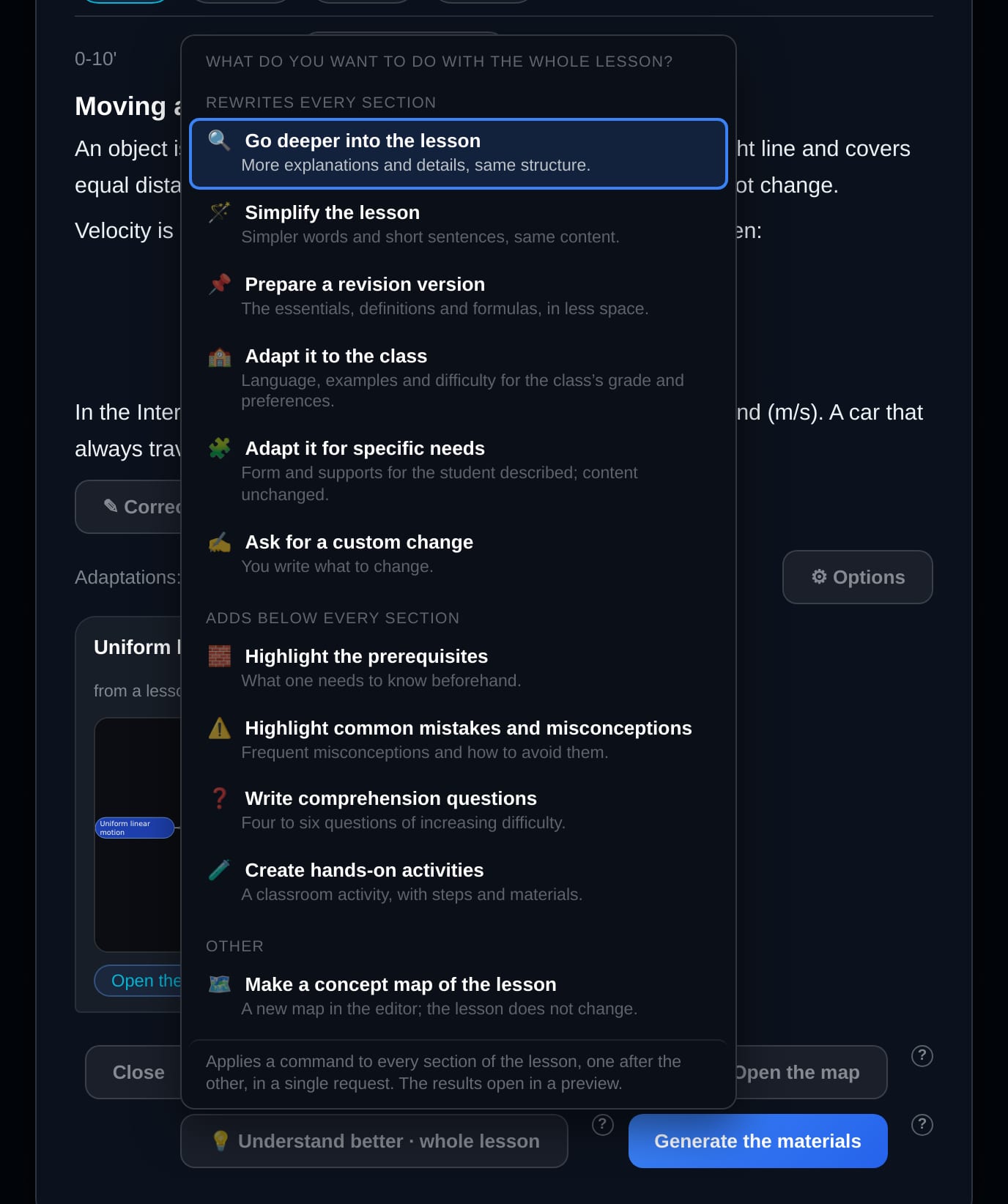
From the same section, or from the whole lesson, you can also create a concept map and continue editing it in the visual editor.
MAPS AND VISUAL STRUCTURES
Drag concepts across the canvas, watch the links redraw and build the arrangement that helps you remember. Add or rename nodes, create new connections, choose colours and shapes, use your own images or generate new ones with artificial intelligence. Your layout remains saved, and the map can be exported as PDF or PNG.

Organises concepts and relationships, highlighting connections, causes and consequences.
Represents processes, stages and dependencies in a clear sequence.
Places events, discoveries and developments along a chronological line.
Shows categories, levels and relationships between broader and more specific elements.
Ask Minerva to add a branch, simplify a section, change a connection or reorganise the structure. When it is ready, export it as a PDF or PNG.

It takes a few seconds, and you can pause it at any time.


It starts from the topic of the lesson or the conversation.
The demonstration recreates the map editor in the app: labels, images, colours, shapes, moving nodes and exports are all available today.
Upload the materials you already use and ask Minerva to take them into account when preparing the lesson. This helps preserve the content, approach and references you rely on.
Save prepared lessons, return to them later and update their content and materials. Today’s work can become a useful starting point for next year.
LESSONS THAT FIT
Minerva prepares the lesson already calibrated to the grade and level of the class. With inclusive learning you can go further: choose the settings that suit each student and Minerva applies them to explanations, materials, tests, flashcards and assessments, without making you start again every time.
ICF PROFILE
Teachers can describe a student’s needs, what helps them and how they work best through a profile structured around the ICF. Minerva uses this to adapt language, steps, examples and checks, without turning the profile into a diagnosis or a test.
Settings can be associated with a code chosen by the teacher. A student’s name or diagnosis does not need to be stored in order to apply the adaptations.
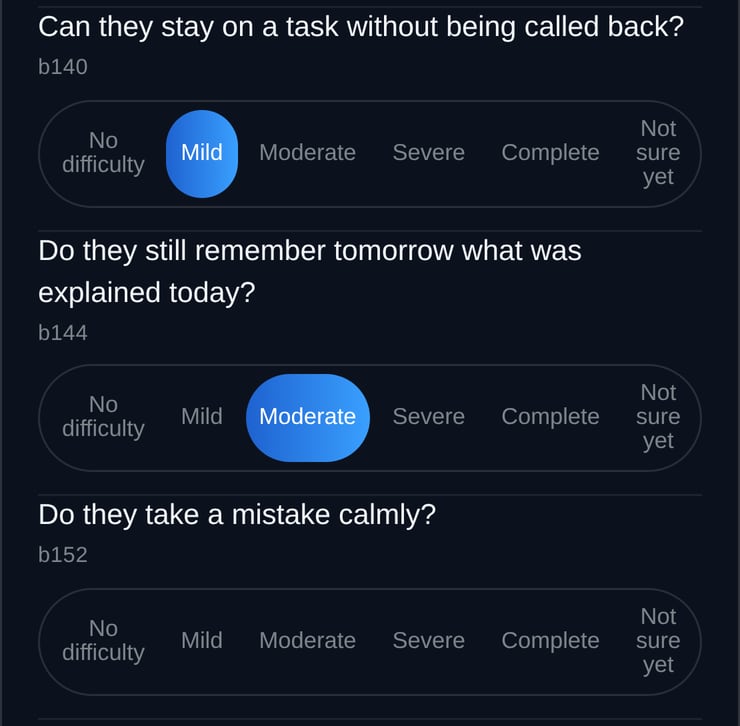
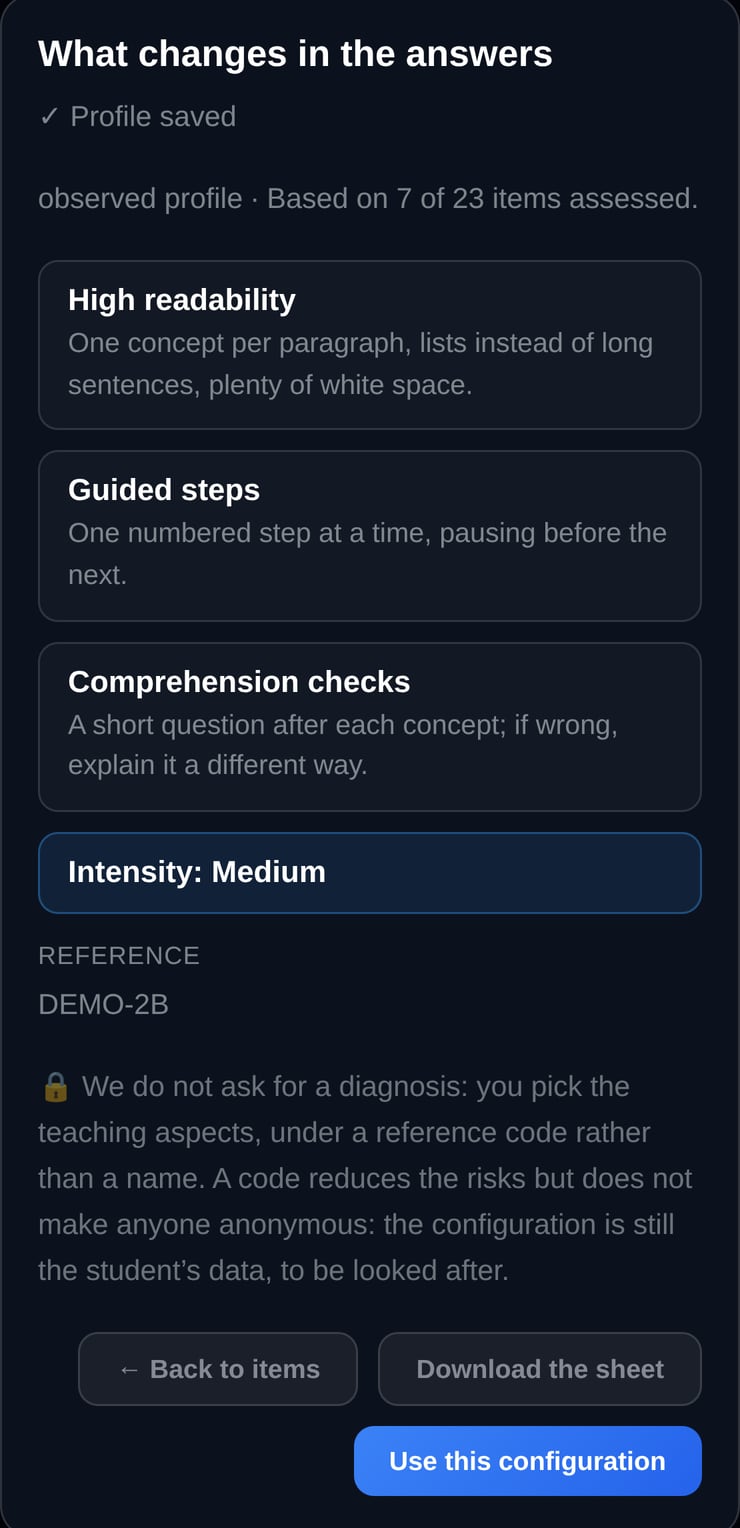
Tools inspired by the ICF framework help describe functioning and the educational context. They do not provide a diagnosis or replace assessment by qualified professionals.
STORY MODE
Turn on story mode and concepts become a story to follow, without losing any of the content: the laws of physics can become an adventure, a historical period a case to solve. It is also a valuable tool in inclusive learning, when a narrative thread helps students stay focused and remember.
Story mode applies to explanations, flashcards, tests and the assessment of the whole lesson, and it combines with the other inclusive learning settings.
TESTS AND ASSESSMENTS
Five question types: multiple choice, true or false, fill in the blank, numeric answer and matching. Formulas stay readable and numeric results are double-checked before printing.
From a topic or from one of your documents, even a scanned one, with 3 to 30 questions. You get the student sheet and the answer key as PDFs, two versions A and B with the questions in a different order, and export to Moodle, Google Forms, Anki and Quizlet.
From a single time slot or from the whole lesson, and it is saved with the lesson. For the whole lesson you can also choose story mode.
The same assessment becomes more accessible: questions are reworded and the sheet is more spacious, while answers and numbers stay exactly the same.
The lesson turns into flashcards to project on the interactive whiteboard, print as PDF or export to Anki and Quizlet.
Students practise with tests of 3 to 15 questions, with a score, explanations, an optional time limit and feedback on strengths and areas to improve.
WHY MINERVA
A general-purpose chatbot can answer questions across a very wide range of topics. Minerva brings together the tools needed to follow a learning path, prepare a lesson and adapt teaching materials with greater continuity.
| Feature | Minerva | General-purpose chatbot |
|---|---|---|
| FeatureLesson preparation | MinervaBuilds an editable timed lesson plan and generates explanations, exercises, solutions and student materials. | General-purpose chatbotCan help write individual pieces of content, while the teacher organises the overall lesson workflow. |
| FeatureLearning configuration | MinervaSubject, starting level, objective and depth form part of the learning configuration. | General-purpose chatbotUsers generally need to provide these instructions within the conversation, and behaviour may vary between services. |
| FeaturePersonal materials | MinervaDistinguishes between attachments used in the current conversation and persistent materials associated with a subject. | General-purpose chatbotMay accept documents, although organisation and persistence depend on the platform and subscription plan. |
| FeatureInclusive adaptation | MinervaApplies simpler language, improved readability, guided steps, practical examples and comprehension checks in a coordinated way. | General-purpose chatbotThe user needs to request and describe the adaptation according to the capabilities of the service. |
General-purpose chatbot features continue to evolve and may vary by product and subscription plan. This comparison describes the different approach taken by each type of tool rather than an absolute limitation of any individual platform.
Begin free of charge and subscribe once you have seen how Minerva fits your needs.
€0
Explore Minerva’s main features.
€15 + VAT per month€150 + VAT per year
For preparing lessons, teaching materials and adapted learning paths.
Prices are shown excluding VAT: VAT is added at checkout according to the buyer’s country. Monthly credits are renewed on the subscription renewal date. Please refer to the commercial terms for information about any carry-over of unused credits.
FREQUENTLY ASKED QUESTIONS
Minerva helps prepare explanations, activities and materials. The teacher remains in control of educational decisions, reviews the content and decides what should be used in the classroom.
No artificial intelligence model can guarantee that every answer will be correct. That is why Minerva lets you turn on independent verification: before the answer is shown to you, a second model checks it again and corrects it if it finds a mistake. Two models working independently rarely go wrong in the same place, so the chance of an error drops drastically. For truly important information, a final check of your own is still good practice.
When enabled, the answer is submitted to a second model before it is shown. This review looks for possible errors or inconsistencies and provides an additional level of checking.
Yes. You can upload notes, PDFs, images and other compatible documents and ask Minerva to use them while you study or prepare a lesson.
A temporary attachment is used within the current conversation. Material associated with a subject remains available and can be used in subsequent conversations.
Yes. When you register, you receive 50 credits valid for 15 days, allowing you to try the main features without providing payment card details. After that, still free, you receive 25 credits every 30 days.
You can continue to view content you have already saved. To perform new operations that require artificial intelligence, you will need to wait for the renewal included in your plan or buy an additional credit pack from your account area.
Enter the next topic you will teach and build the lesson plan and materials from your instructions.


