


Concept map
Organises concepts and relationships, highlighting connections, causes and consequences.

MINERVA FOR STUDENTS
Minerva explains topics at your level, works with your own materials, gives you opportunities to practise and helps you check what you have learnt. Explore an answer in greater depth, take a test, work with formulas or turn a topic into a visual map.
The account belongs to an adult. For a child under 18, a parent sets it up and decides whether and how to let them use it.


It takes a few seconds, and you can pause it at any time.
Explain photosynthesis to me
Photosynthesis is the process by which plants use sunlight to turn carbon dioxide and water into glucose and oxygen.
It takes place in the leaves, where chlorophyll is found: the green pigment that captures light.
6CO₂ + 6H₂O + light → C₆H₁₂O₆ + 6O₂
Configuring your learning session
Minerva uses the subject, level and chosen depth to prepare an explanation suited to your request.
Choose your subject, set your starting level and decide how deeply you want to explore the topic. Minerva uses this information to adjust its language, steps and examples.
When independent verification is enabled, a second AI model reviews the answer before it is shown. This additional check is designed to identify possible errors or inconsistencies.
A verified answer may still contain errors. Important information should always be checked against reliable sources.
Create a test on the topic you are studying, answer within the selected time and receive detailed feedback. Minerva shows what you have understood and which areas still need attention.
WHEN YOU WANT TO UNDERSTAND MORE
With Understand better you can ask for a simpler explanation, an analogy, the three key points, the reasons behind a step or a link to everyday life, and you can also listen to it. You can check what you have understood with a few questions, start a test or turn the answer into a map. Each new explanation arrives as a separate message: the previous one stays as it was, and you choose which one to continue from.
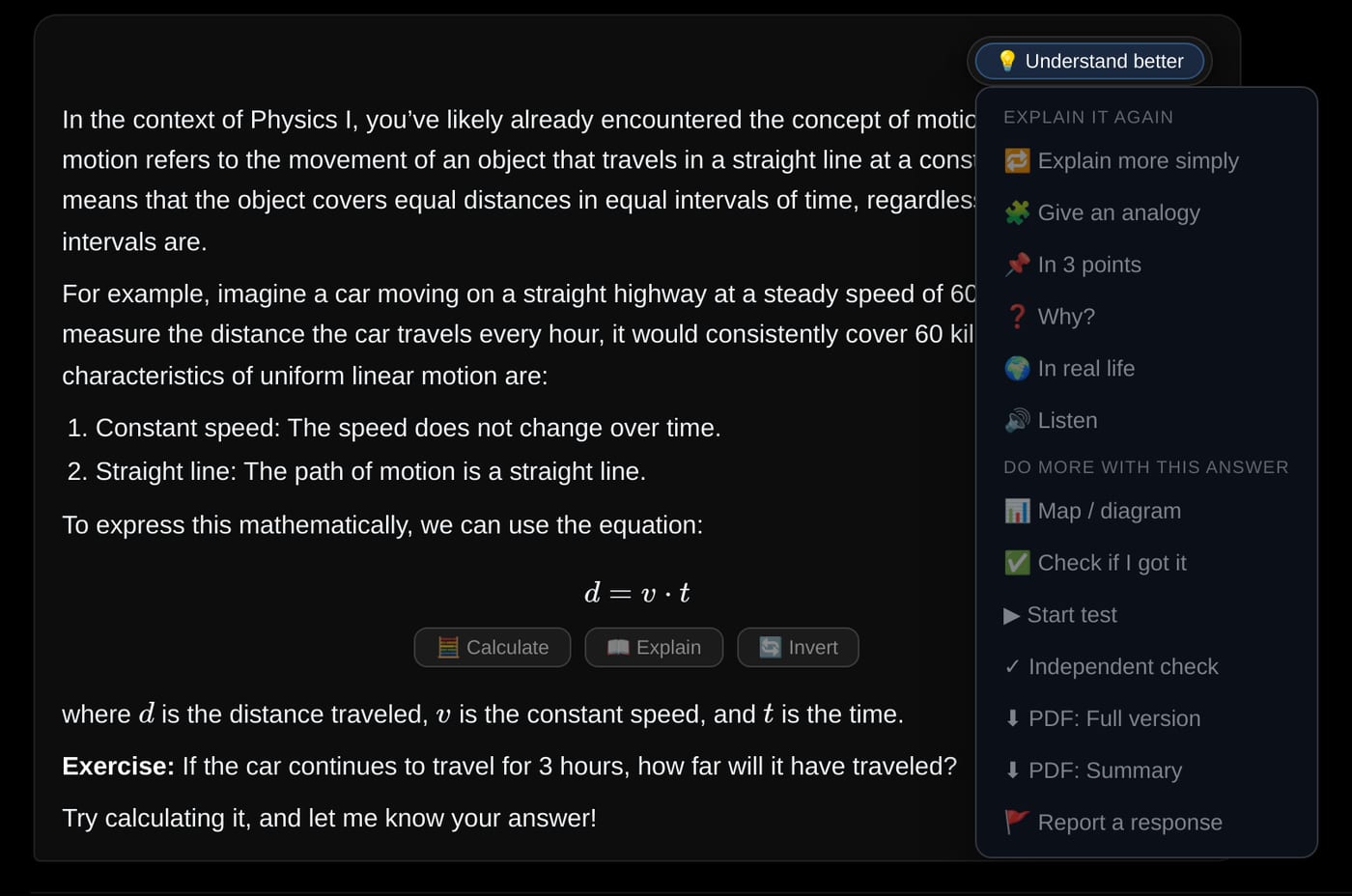
Enter values, inspect the result and explore inverse formulas. When needed, export the calculation to Excel and continue working with it.
Turn a topic into a concept map, diagram, timeline or hierarchical tree. Refine the structure and save it as a PDF.
Upload notes, PDFs, images and documents. Attach them to the current conversation or save them within a subject so that you can use them again later.
Temporary attachments are used within a single conversation. Subject materials remain available and can become a lasting part of your learning workspace.
MAPS AND VISUAL STRUCTURES
Drag concepts across the canvas, watch the links redraw and build the arrangement that helps you remember. Add or rename nodes, create new connections, choose colours and shapes, use your own images or generate new ones with artificial intelligence. Your layout remains saved, and the map can be exported as PDF or PNG.

Organises concepts and relationships, highlighting connections, causes and consequences.
Represents processes, stages and dependencies in a clear sequence.
Places events, discoveries and developments along a chronological line.
Shows categories, levels and relationships between broader and more specific elements.
Ask Minerva to add a branch, simplify a section, change a connection or reorganise the structure. When it is ready, export it as a PDF or PNG.

It takes a few seconds, and you can pause it at any time.


It starts from the topic of the lesson or the conversation.
The demonstration recreates the map editor in the app: labels, images, colours, shapes, moving nodes and exports are all available today.
WHY MINERVA
A general-purpose chatbot can answer questions across a very wide range of topics. Minerva brings together the tools needed to follow a learning path, prepare a lesson and adapt teaching materials with greater continuity.
| Feature | Minerva | General-purpose chatbot |
|---|---|---|
| FeatureLearning configuration | MinervaSubject, starting level, objective and depth form part of the learning configuration. | General-purpose chatbotUsers generally need to provide these instructions within the conversation, and behaviour may vary between services. |
| FeatureContinuity by subject | MinervaConversations and materials can be organised around the subject being studied. | General-purpose chatbotContinuity depends on how conversations are managed and on the features offered by the individual service. |
| FeatureIndependent verification | MinervaCan ask a second model to perform an additional review before the answer is shown. | General-purpose chatbotThe answer is generally produced by the selected model unless the service provides a specific verification feature. |
| FeatureTests and oral practice | MinervaCreates assessments, manages the session and provides detailed feedback. | General-purpose chatbotCan create questions when asked, while the assessment process and feedback depend on the prompt and available tools. |
General-purpose chatbot features continue to evolve and may vary by product and subscription plan. This comparison describes the different approach taken by each type of tool rather than an absolute limitation of any individual platform.
Begin free of charge and subscribe once you have seen how Minerva fits your needs.
€0
Explore Minerva’s main features.
€6.90 + VAT per month€69 + VAT per year
For learning, practising and working with your own materials.
Prices are shown excluding VAT: VAT is added at checkout according to the buyer’s country. Monthly credits are renewed on the subscription renewal date. Please refer to the commercial terms for information about any carry-over of unused credits.
FREQUENTLY ASKED QUESTIONS
No artificial intelligence model can guarantee that every answer will be correct. That is why Minerva lets you turn on independent verification: before the answer is shown to you, a second model checks it again and corrects it if it finds a mistake. Two models working independently rarely go wrong in the same place, so the chance of an error drops drastically. For truly important information, a final check of your own is still good practice.
When enabled, the answer is submitted to a second model before it is shown. This review looks for possible errors or inconsistencies and provides an additional level of checking.
Yes. You can upload notes, PDFs, images and other compatible documents and ask Minerva to use them while you study or prepare a lesson.
A temporary attachment is used within the current conversation. Material associated with a subject remains available and can be used in subsequent conversations.
Yes. When you register, you receive 50 credits valid for 15 days, allowing you to try the main features without providing payment card details. After that, still free, you receive 25 credits every 30 days.
You can continue to view content you have already saved. To perform new operations that require artificial intelligence, you will need to wait for the renewal included in your plan or buy an additional credit pack from your account area.
Minerva can be accessed through a web browser on computers, tablets and smartphones. Some complex activities, such as preparing a detailed lesson, may be more comfortable on a larger screen.
Set your level, ask your first question and discover how Minerva can support your learning.


